Introducing the “LinkedIn Wide Screen” Chrome extension!
LinkedIn’s messaging page felt cramped, so I built a Chrome extension that widens LinkedIn and uses your whole screen. It is open source.
Read this article in Arabic
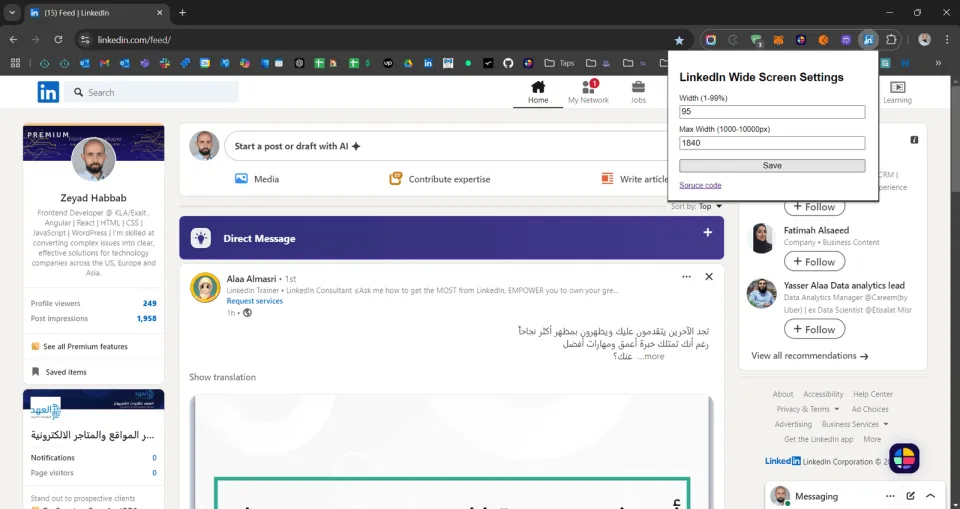
Have you ever felt that browsing LinkedIn, especially the messaging page, is far too cramped? I did. Space on the screen was tight and I couldn’t see everything at once. After years of using LinkedIn, I was tired of constantly switching between sections and losing focus on the messages and content that matter.
So I decided to change that.
🎉 I built LinkedIn Wide Screen, a Chrome extension that widens LinkedIn’s interface and lets you use your whole screen. Now I can see everything clearly without feeling squeezed, and I wanted to share it with you!
With this extension you get:
- A wider LinkedIn browsing experience
- Easier navigation, especially on the messaging page
- A more productive and enjoyable time on LinkedIn
✨ Why did I build it? LinkedIn’s messaging page felt very narrow, and I needed a way to see more content without feeling boxed in. With this extension my screen is used to its full potential, so I stay productive and focused on the conversations and people that matter.
🔗 Download the extension and try it: https://github.com/zeiadhabbab/LinkedIn-Wide-Screen-Settings
👨💻 A call to developers! If you are a developer, I’d love for you to check it out and help improve it for everyone. Together we can make LinkedIn better for all.
Finally, special thanks to Khaled Al-Ahmad for all his support and for encouraging me to use LinkedIn every day!
Feel free to download the extension, try it, and tell me what you think. Your feedback is very welcome.